Custom Software vs SaaS: Which Is Better for Your Business?
Choosing between custom software and SaaS? Compare cost, flexibility, ownership, scalability, security, integrations, and long-term ROI to find the right solution for your startup or growing business.
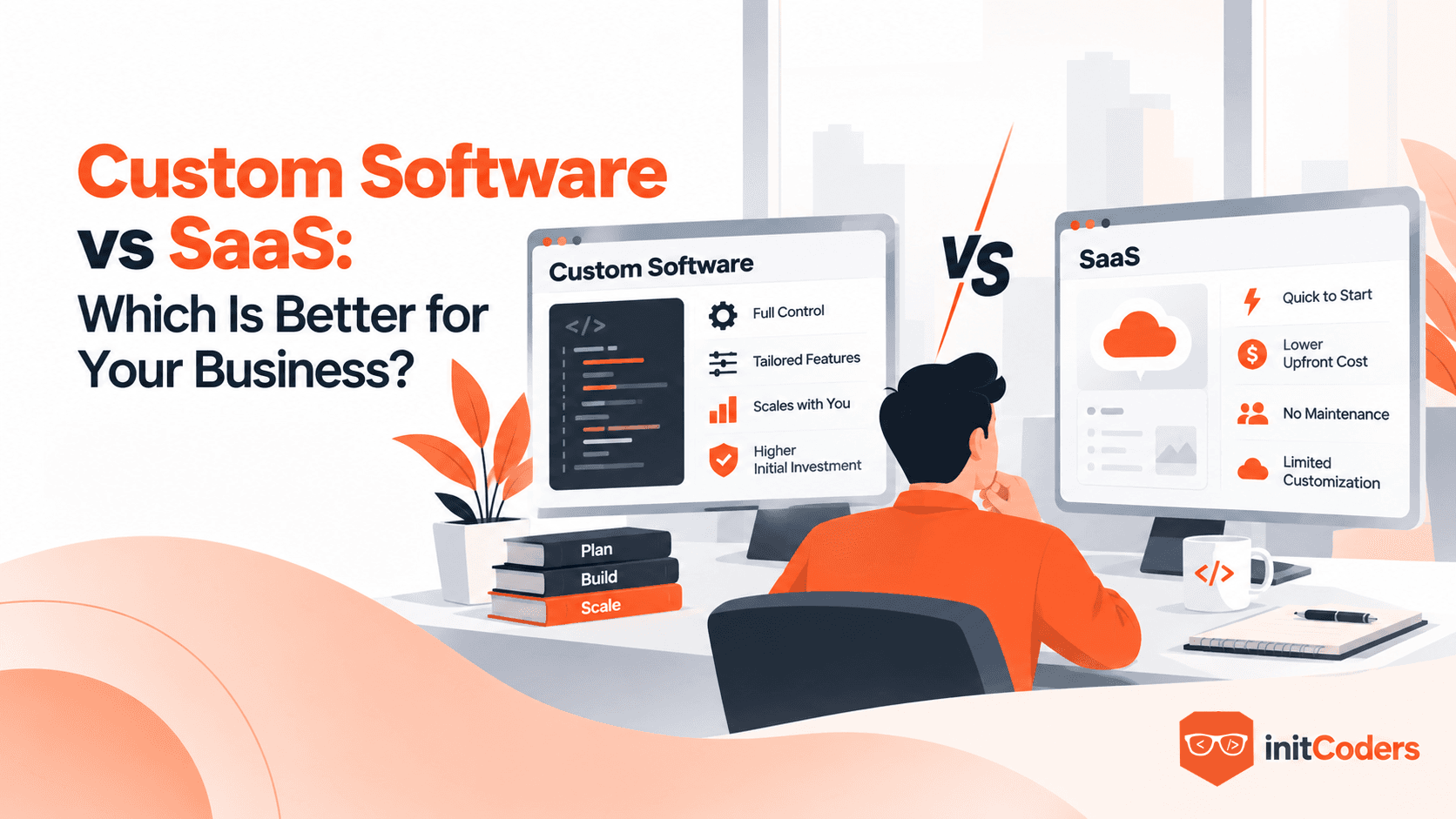
Choosing the right software starts with understanding what your business actually needs. Your budget, workflows, growth plans, and desired level of control all play a role. This guide breaks down SaaS and custom software across cost, flexibility, ownership, scalability, security, integrations, and long-term ROI, followed by a practical checklist to help you make a confident decision.
The Bottom Line: SaaS vs. Custom Software
SaaS (Software as a Service) means you pay a monthly or annual subscription to use software that’s hosted, maintained, and updated by the provider. You access the system online without having to build or manage it yourself. Think Slack, QuickBooks, or HubSpot.
Custom Software means a software system built specifically around the way your business works. You decide how it functions, what features it includes, and how it integrates with your existing systems. Depending on the development agreement, your business can also own the source code and have full control over its future.
Both SaaS and custom software can be the right choice. It comes down to what fits your business, and in many cases, a combination of both works best.
1. Cost
SaaS usually wins on day one. You pay a subscription, set it up, and can often start using it within days.
Custom software costs more upfront — you're paying for design, development, testing, and someone to keep it running afterward.
Here's the part people miss: SaaS isn't free after year one either. Per-seat pricing creeps up as your team grows. Premium tiers unlock features you now need. You end up paying for three or four different tools because none of them does everything. Add it up over three years and that "cheap" SaaS stack can cost more than a custom build would have.
So the real question isn't "which is cheaper right now." It's "which one costs less once I account for the next three to five years."
2. Flexibility
This is where custom software pulls ahead, hard.
SaaS is built for a broad range of customers. You may get most of what you need, but the remaining gaps often become workarounds.
Custom software is built around your processes rather than forcing your business to adapt to the software. If your business runs a certain way because that's genuinely a smarter way to do it, custom software protects that. With SaaS, you often have to adapt your processes to the way the software works.
Rule of thumb: if your process is pretty normal, SaaS is fine. If your process is the reason customers pick you over competitors, don't force it into someone else's software.
3. Ownership
With SaaS, you're paying for access rather than owning the software itself. The vendor controls the pricing, features, updates, and product roadmap. They can also get acquired, shut down, or quietly stop supporting the feature you depend on — and there's nothing you can do about it.
With custom software, you can negotiate ownership of the source code and have much more control over how the software evolves. You're not at the mercy of someone else's roadmap or someone else's pricing meeting.
That said — "own the code" only means something if your contract actually says so. Get the source-code ownership terms in writing before the project starts, not after.
4. Scalability
Both can scale. They just scale differently.
SaaS scaling usually means "upgrade your plan" or "add more seats." Easy, but you're capped by what the vendor built for.
Custom software can be designed to support your expected growth — more users, locations, data, and automation. The catch is that scalability isn't automatic. If the system is built badly in year one, it'll fall over in year three no matter how much money you throw at it. Good architecture matters more than good intentions here.
5. Security
Established SaaS providers often have dedicated security teams and established security practices, but you're still trusting a third party to protect your data.
Custom software gives you control over exactly how data is stored, who can access what, and how authentication works. But "custom" doesn't automatically mean "secure." A rushed, badly built custom app can be far weaker than a mature SaaS product. Security comes from how carefully something is built and maintained — not from which category it falls into.
6. Integrations
Almost nobody runs on one piece of software. You've got payments, accounting, CRM, email, maybe a shipping tool, maybe an AI layer now too.
SaaS integrations only go as far as the vendor lets them. If the vendor doesn't support the integration you need, you may have to rely on workarounds or additional tools.
Custom software can be built to talk to exactly the systems you already use, in exactly the way you need. This matters a lot once you're running five or six tools that all need to stay in sync.
7. Long-Term ROI
This is what really matters: what will the software do for your business over time?
Don't just look at the price. Look at how much time it saves, how many mistakes it prevents, and how much additional business it can help you handle.
For example, if a $50/month SaaS tool does the job well, there's no reason to spend a lot of money building custom software.
But if your team spends hundreds of hours every month doing manual work because your current software doesn't fit your business, custom software could save you a lot of money in the long run.
The key is to compare the value, not just the price. Ask yourself: How much value will this software create or save for us over the next 3–5 years?
Decision Checklist for Startups
For many startups, SaaS makes sense for most operational needs early on — accounting, email, support, project management, and similar functions. Save your money and your attention for the product itself.
Choose SaaS if:
- You need it running this week, not next quarter
- The function is standard (payroll, email, basic CRM)
- You're still figuring out if the business model even works
- Cash is tight and every dollar matters
Consider Custom Software if:
- The software genuinely is the product (you're building a platform, marketplace, or app people will pay to use)
- No existing tool does the thing your business is actually built around
Decision Checklist for SMEs
The signs that you've outgrown your current SaaS setup often become obvious over time: spreadsheets attached to every tool, people manually re-entering data, and workarounds that have become part of the daily routine.
Stick with SaaS if:
- The tools you have are working, even if they're not perfect
- Switching cost and disruption would outweigh the benefit right now
- Your workflows are still fairly standard for your industry
Consider Custom Software if:
- You're paying for three or four tools that still don't talk to each other properly
- Staff are doing repetitive manual work that software should be handling
- The way you operate is a real reason customers choose you — and off-the-shelf tools keep getting in the way
- Growth is being slowed down by software limits, not by demand
Consider a Hybrid Setup if:
- Most of your operations are standard, but one or two core processes are genuinely unique
A hybrid approach can be a practical option for many established businesses: SaaS for standard operations and custom software for the processes that make the business unique.
What This Looks Like in Practice
TravelFirst — custom build. The existing travel booking tools weren't handling TravelFirst's specific Indian GST requirements, leaving the finance team to reconcile parts of the process manually. That's a workflow problem specific enough that custom software made sense. We built GST capture directly into the booking flow, along with live wallet tracking and reporting. This reduced manual work and helped close the compliance gap within their booking workflow.
CoachVantage — SaaS. Coaches don't each need their own custom-built booking and payments system — that's a standard problem shared across an entire industry. So instead of building one-off tools per client, we built CoachVantage once, as a subscription platform any coach can sign up for to manage clients, sessions, programs, and payments.
Restaurant POS — SaaS. Same logic. Most restaurants don't need a completely bespoke system for order-taking and kitchen workflows. They need a reliable platform that handles these common requirements well.
Same decision framework, three different right answers — because the framework, not the tool, is what actually matters.
See more of what we've built in the project portfolio →
Still Not Sure Which Way to Go?
That's normal — the right choice often becomes clearer once you look at your current tools, workflows, costs, and growth plans. We do a free 30-minute session where we look at what you're using now, where it's breaking down, and whether SaaS, custom, or a mix of both makes sense for where you are.